TROUBLESHOOTING & FAQ

Straight answers before you book.

What usually causes these faults, what we check, and what it costs to find out. If your problem is a five-minute fix you can do yourself, we'd rather tell you that.

Call +91 83838 61528WhatsApp us

What's actually causing it.
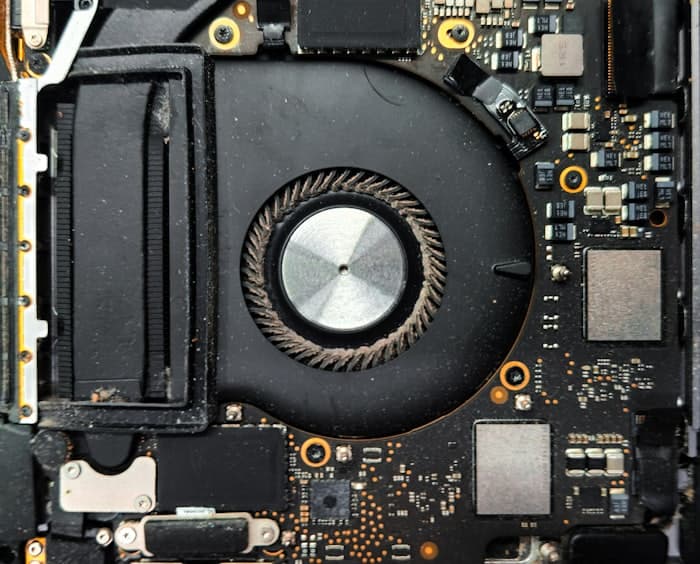
A dust-clogged laptop cooling fan and heatsink

A heatsink like this is why a three-year-old laptop throttles, runs loud and shuts down under load — and it's a clean, not a new machine.

Laptop won't turn on / no display

Likely cause: Often a dead CMOS battery, a loose RAM stick, or a motherboard power-delivery fault — not always the screen itself.

What we do: We check power delivery first, reseat RAM, and test the panel separately before quoting any board-level repair.

Random blue screen (BSOD) or reboots

Likely cause: Usually a driver conflict, corrupted system file, or early-stage RAM/SSD failure.

What we do: We run a memory diagnostic and check drive SMART health to isolate hardware from software before reinstalling anything.

Overheating, loud fan, sudden shutdowns

Likely cause: Dust-clogged heatsinks and dried-out thermal paste — the most common cause after 2–3 years of daily use.

What we do: Full strip-down clean, fresh thermal paste, and a fan RPM check under load.

Data lost after formatting or a drive won't mount

Likely cause: Logical failures (accidental deletion, formatting, corrupted partition table) are usually recoverable; physical failures (clicking noise, not detected in BIOS) are not always.

What we do: We diagnose which type it is first and give an honest recovery estimate — we won't promise recovery on a physically damaged drive.

Wi-Fi keeps dropping or has dead zones

Likely cause: Channel congestion, outdated router firmware, or poor access-point placement.

What we do: We reconfigure channels, update firmware, and test signal strength room by room.

Battery drains fast, or won't charge

Likely cause: Li-ion batteries degrade after 300–500 charge cycles; a swollen battery is a safety risk, not just a nuisance.

What we do: We test actual charging voltage at the port before assuming it — a worn port or failing power IC is sometimes the real cause, not the battery.

Questions we get before every booking.

Does MojoRepair charge for diagnosis?
The Diagnosis + Service Visit is ₹499 (regular ₹799) and comes with no obligation to repair — you'll know the cost and cause before we touch anything further.
What is the typical turnaround time for a laptop repair?
Most laptop repairs are completed within 24–48 hours once the cause is confirmed, depending on parts availability for your exact model.
Does MojoRepair use genuine parts?
Yes — RAM, SSDs, batteries, chargers and displays are sourced directly and matched to your model, not generic aftermarket substitutes.
Can you recover data from a drive that makes a clicking noise?
A clicking hard drive usually means physical head or platter damage. We'll assess it honestly — success isn't guaranteed on physically damaged drives, and we won't charge for false promises.
Will my personal data stay private during a repair?
Yes. We only access what the repair requires, we never copy personal files off a device without asking, and we recommend you back up anything critical before handing it over.
Do you offer pickup and drop-off?
Yes, pickup and drop are available — mention it when booking and we'll coordinate a time.
What warranty do you offer on repairs?
Every repair carries a 90-day warranty covering the part replaced and the labor performed.
Which brands and devices do you work on?
All major laptop and desktop brands, plus custom-built PCs and common home/office networking equipment. If your device is unusual, ask us first and we’ll tell you honestly if we can handle it.
What is chip-level repair?
Fixing the individual failed component on a motherboard rather than replacing the whole board — usually far cheaper. There is a full explanation on our chip-level repair page.
Should I repair my old laptop or buy a new one?
If the repair costs well under half of a comparable replacement, repairing is usually better value. If it's close to that, we'll walk you through the machine's age and remaining life rather than just quoting a number.
Book a repair